How to Minimize Problems With Gravimetric Blenders
The first and best way to avoid blending problems is to choose the right gravimetric blender for the application.


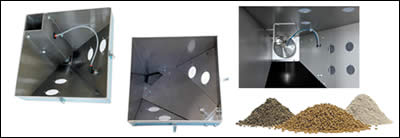
Different types of blender dispense valves are appropriate for different types of materials—pellets, powders or regrind flakes. Shown here: (left to right) vertical valve, corner valve, and pivot valve.

What Are Your Bleeding Needs?
The first and best way to avoid blending problems is to choose the right gravimetric blender for the application. Today’s plastic products are required to have a wide variety of special properties, including surface aesthetics, which means more and more additives and specialty colorants. Increased demand for recycling means that there are more materials with unusual flow characteristics. Wood-plastic composites have introduced a whole new set of requirements for blenders that can accurately blend pellets, powders, flakes, and wood flour at very high throughputs.
Today’s gravimetric blenders can blend from two to 12 components with nominal throughput capacities up to 12,000 lb/hr. Keep in mind that “datasheet values” for blender throughput capacities are usually stated for a best-case scenario, which means blending free-flowing pellets with similar bulk densities.


Most processors today are blending components with varied densities and characteristics, so you need to provide detailed information so that your equipment supplier knows exactly what the blender is expected to accomplish. As is often the case, if you will be running a variety of materials on a given blender, identify the range of characteristics for virgin resin, regrind, colorants and additives to be used.
One of the most common problems encountered with blenders is that some regrinds or additives do not flow properly through the bin to the mixing chamber. This makes it imperative that the blender be fitted with proper bridge-breaking and dispensing mechanisms to suit such “difficult” materials. Blender manufacturers have developed different dispensing mechanisms for hard-to-flow materials. Ask the blender supplier to provide details on how its particular device works. Don’t hesitate to request the name of a processor using that device so you can get first-hand input on its merits.
Answering the questionnaire below can help ensure that you get the right blender for your needs.
DIAGNOSE TYPICAL PROBLEMS
Now that you have done your best to ensure that you have acquired the right blender, you should have minimized potential problems, but they may still arise. Most problems that occur will cause the controller to alarm, which will give you a head start on finding where the problem lies. Here are some typical problems and steps to consider in troubleshooting:
- Erratic Dispensing: Dispense valves are pneumatically actuated, so make sure that there is a good supply of clean, dry air at the pressure recommended by the manufacturer.
Check the air-cylinder operation. Cycle several times with the manual actuator and listen for crisp movement and no air leaks.
Check solenoid operation by cycling several times through the controller, since manual actuators bypass the solenoid.
If the dispense valve is working properly, is material still not flowing? If not, is there an obstruction in the bin? Is the correct material in the bin? Contact the manufacturer for advice on adjusting the dispense device or using a different device to handle the “problem” material. (If none of the above correct the problem, see Load Cell Operation, below.)
- Overfilling of bin: This is typically caused by a failed load cell.
- No filling of bin: Is there adequate material at the source? Is the material loader or vacuum receiver operating properly? Is there an obstruction in the material line? If you use central loading, are the pump and controller working properly? Finally, check load-cell operation (see below).
- No blending of material: Is the mixer motor working? Are the material loaders/vacuum receivers working? Are all components wired properly and are all connections tight? (Note: For non-throat mounts, an automatic shut-off valve must be mounted below the mixer.)
- Poor blending or incorrect materials ratio: Check for erratic dispensing (see above). Is the mixer motor turning the mixing blades uniformly? Check load-cell operation (see below).
- Load-cell operation: Follow the manufacturer’s instructions to perform a “zero-weight calibration.” Next, put a small amount of hand pressure on the weigh bin and look for a reading on the display. Removal of hand pressure should return the reading to zero, ±20 grams. Then perform a “full-weight calibration.”
A WORD ABOUT CONTROLLERS
The latest blender controls make troubleshooting much easier. Most blenders have a microprocessor controller with simple thumbwheel entry of component percentages. Alarms, diagnostics, and set-up procedures are displayed as alphanumerical codes, which you have to look up in the manual to make sense of them.
However, in recent years, processors have demanded more sophisticated controls that often include a more user-friendly interface with two-line, 40-character vacuum fluorescent display or a full touchscreen. Both of these can display clear messages in plain English or other languages.
ABOUT THE AUTHORS
John Kraft has provided marketing/advertising services to Novatec, Inc. in Baltimore for 15 years. He can be contacted at (410) 789-4811, sales@novatec.com; www.novatec.com
Joel Schwartz is technical services manager for Maguire Products in Aston, Pa., where he has been for 16 years. Contact him at (610) 459-4300, info@maguire.com; www.maguire.com
Related Content

Bulk-Bag Filler Can Accommodate Wide Materials Range
Suited for powders, granules, pellets, and other bulk materials, even materials with high bulk densities.
Read More
Cut Loading Time Through Direct Charge Blending
Direct charge blender loading, a vacuum-powered automation process, can dramatically improve loading time and reduce material costs. In this article, we address ten common questions to help you determine if the systems are right for your facility.
Read More

Wisconsin Firms Unite in Battle Against Covid
Teel Plastics opened new plant in record time, partnering with AEC & Aqua Poly Equipment Co. to expand production of swab sticks to fight pandemic.
Read MoreRead Next

Recycling Partners Collaborate to Eliminate Production Scrap Waste at NPE2024
A collaboration between show organizer PLASTICS, recycler CPR and size reduction experts WEIMA and Conair will seek to recover and recycle 100% of the parts produced at the show.
Read More
Making the Circular Economy a Reality
Driven by brand owner demands and new worldwide legislation, the entire supply chain is working toward the shift to circularity, with some evidence the circular economy has already begun.
Read More
Beyond Prototypes: 8 Ways the Plastics Industry Is Using 3D Printing
Plastics processors are finding applications for 3D printing around the plant and across the supply chain. Here are 8 examples to look for at NPE2024.
Read More